
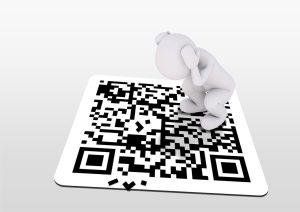
The QR code is an easy and secure way to store and transport data, widely used by companies involved in the supply industry. Тhe first similar system was created in 1994 in Japan. However, only a few years ago, QR codes became more widespread thanks to the advancement of mobile technologies.
The abbreviation QR stands for Quick Response, and that is exactly the code’s main purpose. It can deliver with 100% accuracy up to 4,000 characters, allowing companies to save space on their products and lower their production costs. Of course, this method can only be used for non-vital information.
To read the encrypted information, consumers need to use a QR reader, a common built-in feature in most modern mobile phones and tablets. In the next paragraphs on this page, we’ll share valuable information about the QR codes and if they vary in any way. Security is also essential!
Some codes can carry sensitive information, including passwords or payment details. Convenience is not always a factor when it comes to data transfer, so you need to know how safe the method actually is. Stay with us and learn the main types and styles of QR codes and how they work!
Definition of QR Codes and Where to Use Them
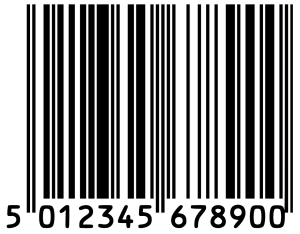
The QR code is a modern and advanced version of the classic barcode, used since 1951. It was truly a revolutionary invention, making it possible for the manufacturers to mark their goods and link them to simple digital systems. However, with the evolution of technology, the need for better solutions is growing.
Standard barcodes are quite handy, but they have a huge disadvantage, allowing them to be read from top to bottom only. That may have been enough decades ago, but not today. The QR codes can be read in two directions – right to left and top to bottom.
The one-dimensional codes can store no more than 85 characters or only several words or numbers. Quite insufficient according to today’s data transmission standards. In light of that, it seems logical that the need for better digital code systems has arisen in a very complex industry sector such as automotive.
In 1994, one of Toyota’s subsidiary companies Denso Wave invented an enhanced barcode system. It could allow the encoding of alphanumeric characters and the Japanese Kana alphabet and Kanji symbols. Today, the QR codes can carry up to 4,000 characters, in any sequence. They can be used in numerous ways, including for
- Sending, receiving, and authorizing digital payments in cryptocurrency wallets
- App downloads or software updates
- Log in to websites and complete ID verification processes
- Storing passwords, encryption information, and other sensitive data
- Saving space on any physical material and redirecting customers to a digital source
In fact, the QR codes implementation is unlimited since in the XXI century, information is everywhere around us. We need space or a secure way to provide data to particular users. But how secure the QR code could be? Continue with our in-depth analysis and find out!
QR Code – How It Works
To read the information behind a particular QR code, you’ll need to have a suitable reader. Some devices are equipped with built-in apps, while others have the software implemented in their cameras. If you use an older device, you might need to download and install a QR code reading application. Luckily, both Google Play and iTunes offer many of them for free. They are light and easy to use, taking only a few MB of your memory. The next step is to scan the QR code! Usually, you can do that from any angle and still get the encrypted information. It will visualise instantly!
So far, it sounds easy, but what exactly does the QR code reader do! First, let’s say that the code stores data in the form of pixel series on a grid with the shape of a square. Before reading the information, the scanning device must determine the QR orientation. It does that through the finder pattern or the nested black and white squares in the three corners. Now, the software must decrypt the data by breaking the whole code into smaller patterns and adding a value to each one, according to its colour, size, and location.
Parts of the QR Codes

No matter how fast your reader scans and shows you the QR stored information, this type of data transfer is very complicated. To understand its complexity, you need to learn its different parts. Let’s start with the Quiet Zone or the white margin space outside the code’s frame.
You’ve certainly noticed the big white area around each QR code, but you’ve never thought about its important role. It must be absolutely empty, without anything printed on it. Otherwise, the scanning device and software will not be able to locate the image borders and locate the encrypted information.
The next part of the QR codes is the aforementioned Finder Pattern. The three black and white nested squares usually lie on the top left and right and the bottom left corners, determining the code’s boundaries. They navigate the QR reader, granting it access to the inside stored information.
In theory, from this moment on, the human brain should be capable of starting the decryption process. However, before inventing an entirely independent AI, software programs will need additional targeting in case of inaccuracies. In this particular case, if the image is skewed or pointed at an angle.
Alignment Pattern is another smaller square implemented somewhere among the pixels. In most cases, it is somewhere near the QR code’s bottom right corner. Its role is simple yet vital – to help the software clear the image and better assess its borders.
The next part of the code is not always visible to the naked eye. The Timing Pattern is a line in the shape of the letter L, going through the Finder Pattern squares. It helps the QR reader to locate all patterns among the data and recover information if the code is damaged.
Besides Data Cells, the Version Information module is the last major part of all QR codes. The box is usually hidden in the top right part of the image, informing the reader devices and their software for the format, type, and version of the code. Currently, there are more than 40 different variants.
Main QR Code Types
Despite the many QR code versions, there are 4 major types according to the used symbols. The input mode of those with the largest storage potential is Numeric or Alphanumeric, capable of holding up to 7,089 and 4,296 characters. Below, we’ll list the most widely used QRs according to their actual types!
Static QR Codes
These are the simplest codes with dense data patterns. They can’t be edited and include fixed URL destinations. The content must be clear with no mistakes otherwise, they become useless. In fact, that makes the static QR codes imperfect and suitable for limited use!
Dynamic QR Codes
The dynamic QR codes are the opposite of the static ones! They allow changes, and creators can edit them easily. Unlike statics, they can also be tracked and can store larger volumes of data. They are widely used in many businesses, including restaurants, vCard companies, online stores, and numerous others.
Location QR Codes
This type of QR code has become more and more popular in the marketing industry. In short, you can encrypt the location of your business in the pattern and provide it via every kind of advertising material. The URL will automatically open into its Google Maps app when the user scans the code.
Video QR Codes
The idea behind the video QR codes is similar to the previous type. Nowadays, many users watch videos on paid or free platforms, like YouTube. Track and open your favourite videos by simply scanning the code from posters, for example. Instead of physical locations, these QRs contain URLs.
How to Generate a QR Code?
Basically, creating a QR code is easy and free of cost! Of course, you’ll need suitable Generator software. There are different online apps available for desktop or mobile usage. The first step is to choose the type of your QR code, which depends mostly on the type of information it will include. The next step is to enter the data and customise the QR code. Don’t forget to generate and test it before finishing the process. You can always edit the code on a later basis if it’s dynamic! The last thing to do is to download the QR code. You can do it in PNG, JPG, SVG, or EPS file formats or in PDF, but you need first to upload your PDF file to the generator. Moreover, not every app can work with this file format! Overall, creating a QR code is much easier than understanding its essence.
How Safe the QR Codes Are?

Generally, attackers can’t hack a QR code and steal the information inside. Payment transfers, passwords, and other sensitive information are safe! However, the issues are of another nature. Often fraudulent companies and individuals spread malicious codes or replace original ones with their own customised content.
Like locations of legit websites, the QR codes can carry URLs of phishing landing pages. Unsuspicious users may disclose personal information and get scammed. Moreover, mobile devices are known to be less protected and secure, so resources can potentially be stolen. Credentials can be taken from your device by simply visiting a malicious website!
From this point of view, not the QR code but its content could be a threat! In most cases, people are not even aware that their devices have been infected. People, on the other side, can reach and scam your contacts on your behalf via email or social media.
Although unlikely, it’s not impossible for scammers to take full control over your phone or tablet. If you keep your apps unlocked, this could give them control over your finances as well. Scary sense, isn’t it? So since we can’t read the QR codes on our own, what we can do to protect ourselves.
Well, the solution is quite easy and only involves care when we decide which QR reader to use. The random ones provide lower or even no protection! On the other hand, some apps alert for potential dangers, tracking the URL’s origin. This software may cost you a few pounds, but it’ll definitely be worth it
Implementation of the QR Codes
As we already mentioned, this method is widespread among many industries. Most QR codes use examples to significantly multiply the effect of particular campaigns, like marketing, sales, healthcare, etc. A recent example of their efficiency is the fact that many countries used and still use them for COVID-19 tracking.
Today, consumers will hardly find any product without a QR code on it. From bottles of water to massive 40ft HC containers, carrying tons of goods. The packing industry adopted this type of data transfer quickly and with great success. The automotive and aerospace industries also rely on QRs to track parts delivery.
When discussing shipments, we can’t afford to miss the Postal Services. QR codes are a simple and cost-effective way of tracking parcels around the world. They can be used for authorising payments, refunds, and other financial services. Finally, QRs find brilliant implementation in education.
Customisable Codes
Most often, the QR codes are in black and white, indistinguishable from others, and don’t provide any information about the brand behind them. In most cases, all that is not necessary, but if you want to market your products better, a few tricks might help!
The Advanced Customisation tools of every QR code generator can help you build a better reputation and make your brand more attractive. The special kit allows users to change the colour of the Finder Pattern squares. They can also modify the whole pattern of the code, its shape, and background. In addition, you can add your logo and make the codes unique in terms of style as well! These QRs are instantly recognisable by consumers, who find it easier to trust such companies and links. But no matter what you do, don’t forget to test your customised codes before releasing it!
The Future
QR codes already have a wide implementation, and it’s unlikely to be replaced in the near future. However, they might be upgraded! Many innovative blockchains prefer using this light technology and strive to minimise its security disadvantages. Furthermore, many governments include QR codes as mandatory for many industries.
For example, the European Union obliges consumer electronics manufacturers to put such codes on packaging. They must provide essential information regarding the product features and the customers’ return and exchange rights. If technology is bound by laws and regulations, it usually becomes more and more important with time.
From another point of view, more unconventional thinking entrepreneurs are already working on hybrid solutions based on contactless technologies and QR codes. Combined with the 5G power, these ideas can really bring humanity closer to great achievements of a new generation. These companies focus on day-to-day issues that people deal with!
Conclusion
No matter what the future holds, it will undoubtedly be easier to achieve through QR code technology. It’s exciting how such a simple solution can cause such a massive world-scale impact. If you are a QR fan, look for a free generator and make a code with your tomorrow’s tasks, for example.
On the flip side, we must be careful when scanning random images as we never know what is on the other side. Browse for some security companies offering QR readers and test a few to see the difference. Although the best things in our world are free, the highest quality software is not!
If you are an entrepreneur, learn how to make your business modern. Check out the fantastic QR code styles, like Aztec, Maxi, and Semacode, and make a mix with a customised flavour. In conclusion, we hope that you had a good time with this article and we expect your comments and questions!